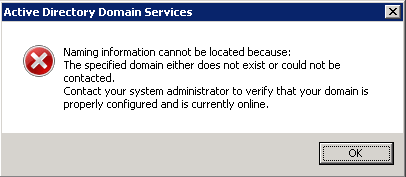
Naming Information cannot be located because: The specified domain either doesn’t exist or could not be contacted. (Windows Server 2012/2016/2019/2022)
Good news! the fix is working for Windows Server 2022 also! Following comment is useful
Just had a similar problem on Windows Server 2022. EventId 14550, DfsSvc – “The DFS Namespace service could not initialize cross forest trust information on this domain controller, but it will periodically retry the operation. …” Changed HKLM\CurrentControlSet\Services\Netlogon\Parameters\SysvolReady to 1. … and it worked! No reboot needed.
I met a difficult situation while setting up a DC for a new forest in Windows Server 2012 . ADDS has been setup and promoted the server as the Domain Controller for the new forest/domain. But none of the AD tools were not able to open, says a DNS error always similar to the one showed here
When digging in to the machine, error messages found on the Event viewer are:
The DFS Replication service failed to contact domain controller to access configuration information. Replication is stopped. The service will try again during the next configuration polling cycle, which will occur in 60 minutes. This event can be caused by TCP/IP connectivity, firewall, Active Directory Domain Services, or DNS issues.
Additional Information:
Error: 1355 (The specified domain either does not exist or could not be contacted.)Active Directory Domain Services was unable to establish a connection with the global catalog.
Additional Data
Error value:
1355 The specified domain either does not exist or could not be contacted.
Internal ID:
3200e24User Action:
Make sure a global catalog is available in the forest, and is reachable from this domain controller. You may use the nltest utility to diagnose this problem.The DFS Replication service failed to contact domain controller to access configuration information. Replication is stopped. The service will try again during the next configuration polling cycle, which will occur in 60 minutes. This event can be caused by TCP/IP connectivity, firewall, Active Directory Domain Services, or DNS issues.
Additional Information:
Error: 1355 (The specified domain either does not exist or could not be contacted.)
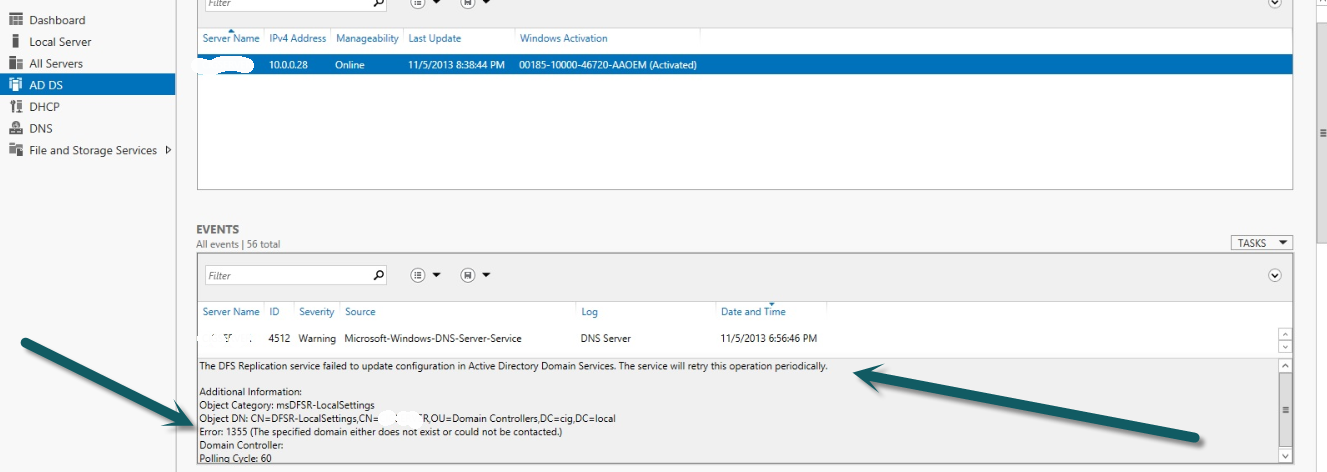
The errors indicated that there is a problem with DFS and sysvol seems to be not accessible.
The solution seems to be very simple
Go to Registry editor and open the key SysvolReady at HKEY_LOCAL_MACHINE\SYSTEM\CurrentControlSet\Services\Netlogon\Parameters
If the value of the key is 0 change it to 1. If the value is 1 change it to 0 and ‘Accept’, again change to 1 and accept. Exit registry editor.
Great !!! Worked like a charm.
It really worked! Thanks.
Great to hear that it helped you !!!
you are a life saver, thank you very much
This is realy work, you save my life 😀
Great to hear that it helped you !!!
Exultant dear it’s really work.
Exultant dear it’s really work. Thank you
Great to hear that it helped you !!!
such a relief… thanks
Good God! Was pulling my hair out. Excellent, so quick and painless. Thanks so much 🙂
thank you is really work
Yes This is best solutions
I setup a domain controller using an eval version of Server 2012. I rolled this server out to a production environment while I waited for my server licenses to arrive.
I soon realized that you cannot activate an eval license if you have already run DCPROMO. After demoting/promoting my server I was getting this error (among many others).
I cannot express how happy I am that I found your blog. I was preparing to….??
Hello Steve Ellis,
Are you saying that my article has solved your difficulty? Or are you looking for more help?
Worked like a charm! I was stressing out BIG time!! I followed all the steps from migrating to 2012 STD from 2003 SBS and then ran into this issue after demoting the old server. THANKS!
You really saved me. Was thinking to do the domain reinstall. Worked like a charm.
It worked!! I worked on this issue for months! Now, the question is what did that change to 1 actually do to correct the issue.
Great to hear that the article helped you to resolve an issues for months !!!!
Definitely, it can be a bug. MS may taken care on the next patch release
MS haven´t take care of it. I had the same issue with Windows 2016….. and ………
…… ManU´s magic formula still works. Thanks a lot.
In my case it was about a second DC that were not able to open ADDS tools when the first DC was down. Even the first DC had all FSMO roles, this was not a reason to fail. (many people ware talking about seizing the roles. I didn´t find it logic). In addition, DNS on second DC was OK and I was able to ping the second DC from itself with the domain name. So the naming information error is also a bug.
Just a question ManU: how could you find the solution ? (I know just few things about registry editor)
I am updating the post with your observation of the same issue on Windows 2016 also.
Great to hear that it helps you out also. I am getting many posts saying that this posts helps them!
I have no clue, why MS hasn’t taken this bug so far. May be they knows that a useful post is available to fix this 🙂
I have experienced the same issue during 2013 and fixed it with the help of some indications found from some online references. I don’t exactly remember the clue on getting this fix 🙂
Thanks,
Manua
thank you very much , i found exact solutions, thanks again
Thank you so much
You saved my day
You are a lifesaver. Thank you! This was exactly what I needed.
You just saved me a ton of time — keep up the good stuff
Thanks alot, I checked during 3 Weeks about this problem.
GOD BLESS YOU TOO MUCH !!!!!!!!!!
That’s really awesome. It worked. Thanks!!!
What a useful tip! Worked straight away! Excellent share! Thanks!!!
AMAZING!!!!!!!!
Thank you SO MUCH!!! it worked after a week of trying !!!!
You are great.
Thank you.
and Thank y again
typical Microsoft issue
fantastic! 🙂 its realy worked!
@ManU – I can’t help but post yet another heartfelt THANK YOU for your answer. I just wish I had found it a week ago. I’m not quite sure what the fancy wizards are good for if one still has to mess with the registry.
Outstanding. Worked on this all day and was totally stumped. This got us back up immediately. Thanks for posting!
Perfect solution………….
Perfect solution……
Thanks so much
THANK YOU ALOT!! i just did a recovery on my Win2008 Domain Controller, then it prompted the same error shown above. your solution have saved my life. thanks you
THANK YOU>> YOU SAVE MY LIFE
Verry verry thanks. I like you:]
Oh my LORD! I think i’m going to cry! I am soooo relieved to have found your post. Only wish i could have found it 4 hours ago! Thank you thank you from the bottom of my heart!
Thank you soooooooooooooooooo much…. You save it..
u saved my day
Thank you very much for this fix! I had promoted/demoted a couple of times due to the error message, thinking I had missed a step. After double/triple checking my steps nothing was missed, and the error message still existed. Came across your fix, and BAM! Up and running.
Thanks a Lot…… I am feeling great now…Thanks A lot
Excellent dude.. It Worked!!!!!!!!!!!!!
THank you very much.. It workrd….
It worked like a charm. Thank you.
Yes Sir!
thanks. but can you tell the reason why did the value changed
Simply a Bug in the program may be 🙂
Awesome!!!! after searching a 2 week, now my problem got resolved. Thanks a lot cheers……….
Man, it really works! I was having this problem about 3 days, I am so glad man…THANK YOU!
I have been using Hyper-V replicas to create a test environment. I couldn’t get the DC to actually perform as a DC. I couldn’t connect to AD DS. Made the change that you suggested and now it works.
Thank you very,very much!!!
Excellent.. thanks a lot..
Wowwwwww
Really amazing solution. I just now resolve my problem while doing this steps.
thank you thank you..
words cannot describe my feeling now.
just about to perform DC migration tonight, thought this issue relate to new DC was setup within current DC domain.
I was so wrong. many thanks friends.
This worked for me as well.
Awesome Post, Thank You!
Love you – you save my life
really appreciate your help
Hi, thanks man you safed my life!
thank you
tank you ,It was great 🙂
Thanks dear..Really work. Hope it also work in DC replication.
It worked right away. Thanks a lot for sharing
Excellent point. It saved my time. Thanks a lot
Thank you so much……
Thanks a lot for the RegKey change.
In our situation, we have 2012 R2 domain controller, with all FSMO roles.
Created a replica with Veeam and put the replica in an isolated lab environment for testing.
Nothing was working for AD DS, with the RegKey change from 0 to 1….BOOM!!!
Great info!
Awesome…. Awesome…. thanks Geek
Gr8 It works
Greate post. Keep writing such kind of info on your page.
Im really impressed by it.
Hi there, You have done an excellent job. I’ll certainly digg it and personally recommend to my friends.
I am confident they will be benefited from this website.
very very thanks.. u saved my life 🙂
Thanks .It worked.
Thank you so much…
cool.. its worked…. thanks a lot. my 2 week search ends up here.. 🙂
Thank you so much.
Spent many hours to migrate from a 2003 server to 2012R2, and after forcing unregistering the old server from the domain [dcpromo], domain was gone!!! I was desperate, imagine customer’s employees coming back from summer holiday next Sunday to a non functional environment? you just save me from big embarrassment!!!
Great to hear that the post has helped you much !
ditto!
It worked for me thanx
Wonderful stuff. Worked for me big time. Thanks @ManU
You just saved me big time. Thanks a lot man.
Thanks Bro.
Bringing up a single DC on a isolated network for testing, not sure why this didn’t just work. My 2012 DC even had a different event ID 4015
Hope you are good now !
really- its working.
graet…
saved my day, thanks
Yes worked. Guys in my case i had taken the backup of active directory and restored and after i was getting the above error. With this change in the registry i could get back AD.
Wondering , how does this work ???.
Regards,
Siraj
Yes worked. Guys in my case i had taken the backup of active directory and restored and after i was getting the above error. With this change in the registry i could get back AD.
Wondering , how does this work ?.
Regards,
Siraj
I have tried to dcpromo and keep getting error domain controller could not be contacted for the domain. I have tried the method that you suggested but no luck for me. The registry for the sysvol key from the primary DC is 1, anyway as you suggested if the value is 1 then change to 0. After that change it back to 1 from 0 and exit. I tried to dcpromo again and getting the same error. Any further advise? Thanks.
Hi,
Sorry to hear that you did have the issue again even after following my tips. At the same time, as you can see there are many people has shared their thought that it helped them ! Thus, I assume, your problem is something different and need more details about it so that I can help you to fix that
Thanks,
Manu
This works like MAGIC…. You just saved souls and lots of sleep for me and my team.
It really worked! thank you!
AWESOME!! Thank you!!! You saved my life! :))))
Thank you very much. It saved me a lot of time and make me stress free.
Thank you!! (This wasted 3 hours of my time until I found your post).
Thank you! It works.
thanks a lot ….it really work
After reading lots of webpages with almost useless guides, this finally solved problem. And it’s much easier than anything else I met before. Thanks
oh my GOD lol. I’ve spent nights up trying to figure this out thank you so much
Ty for help It works
Its wonderful and excellent. This post resolved my client’s problem and released my 2 days tension. Thank you http://104.210.7.142/ .
It fixed my issue which I was struggling for 2 days, thank you very much
Thank you so much MAN you saved the day 🙂
worked for me
Made my day easy
Great job.
Incredible – saved me a weekend of work !
Thanks
LOVE YOU!!!!! Saved my ass big time!!!
This worked!! After restoring Xen VM, my whole domain was down and this simple fix got it up and running! Been searching for hours and couldn’t fix it! Thanks!
i can’t believe it’s working again thanks
Thank you, it worked like a charm
Great step by step to fix my issue. Thanks for posting!
You legend for this simple post.
I tried so much from even viewer and dcdiag everything.
It was really helpful!!! Thanks a lot.
What a dude…. I’ve been wracking my brains for hours with this and was thinking it to be with replication, even though we don’t have replication setup. I have a test environment where I took a system image of a domain controller but after a few weeks I ran into the problem. Seems to be working now, didn’t even have to restart.
OMG. I just spent 8 hours on this task. I can’t believe this worked.
Thank you so much.
Спасибо! Искал решение целую неделю и нашёл! 🙂
Thank you so much.
Thank you My brother you save my life
I had this today, I almost had a heart attack when I got this error, thanks for posting 🙂
Thanks, I was struggling to have Win 2012 R2 BDC play the roles of the PDC for a whole day! I can now say I have a backup. Worked like charm.
IT WORKED, been fighting with this for days ripping my hair out. thank you!
Thanks, it’s works
tanksarash
Thanks you sir it”s working fine
Thanks you sir
its working fine
AMAZING!! thanks
You rock man. It worked like a charm!!!!
“Im obliged for the blog post.Much thanks again. Fantastic.”
I thought I will be creating my domain from scratch, but this “simple” thing really works. You are awesome 🙂
2017 And still saving lives
You are Genius my friend. Thank you so much.
Thank you very much,
it worked for me
Thank you !!!!!!
Yes….it worked out. Thank you very much……😃
You are the Man
Thank you very much! You saved my life!
THANK YOU!!!!!!!!!!!!!!!!!!!!!!!!!!!!!!!!!!!!!!!!!!!!!!!!!!!!!!!!!!!!!!!!!!!!!!!!!!!!!!!!!!!!!!!!!!!!!!!!!!!!!!!!!!!!!
You had saved my life!!!!!!!!!!!!!!!!!!!!!!!!!!!!!!!!!!!!!!!!!!!!!!!!!!!
Thank you so much! Worked like a charm 😉
Honestly thank you so much; I was in a panic and you saved the day!!!
Can confirm this also works on Server 2016
Great to hear that it works for Server 2016 too. I will update the original content with his details
Thanks,
Manu
YOU HAVE NO IDEA HOW MUCH THIS HAS HELP ME.
You are aces in my book.
Thanks
Save my week, really tks you very much and do appreciate ,
life saver. this worked and is a godsend. thanks for the hard work and sharing the knowledge
Life saver! Thanks a lot Manu!
I was on the left flank of Hell’s cloister about to pull the trigger, when an angel appeared with a URL to this article.
Thanks
Same here, Ben! Thank you Manu, what a life saver.
You are a life saver and I freakin’ love you!
I had two replicated DCs that for some reason stopped authenticating overnight and I got this message. This tip allowed me to get into AD and do what I needed to do to diagnose and get the DCs back up and running.
Thank you sir!!! You are the best.
yes sir problem solved
u saved my life
Great Dear, its working thanks so much
My bacon has been saved!!
Thank you! Good info to have – This saved a clients DC, after we were struggling with what we thought were Exchange problems…
Well Done Bro! it worked for me too …
Thanks a lot..it really worked…i think it’s hard to guess
Well Done !! worked for me too …..:)
Omg, life saver… Outage on Xmas morning and this was the solution!!!!
Great post! Saved my weekend!
Thanks a lot .it saved me a lot of time
Thank you for sharing this fix. Help me a lot!
Thanks!
Thank you sir!!! You are the best.
Thumbs up!
Thank you very much!
It works for me on a disaster recovery enviroment
PS no restart required
I appreciate, cause I found exactly what I was looking for. You’ve ended my 4 day long hunt! God Bless you man. Have a great day. Bye
Oh dear friend, you saved another Exchange Admin with this solution! Worked! Worked! Worked!
Indeed let Heaven bless you majorly!
I really appreciate this post. I抳e been looking all over for this! Thank goodness I found it on Bing. You have made my day! Thx again
Thank You, Thank you soooo very much…now I can continue with building my lab….
Thank you so much. You just saved my life.
Thank you once again. Can’t thank you enough
You are Genius!! OMG – Gold STAR!!
Lifesaver. Still valid after all these years.
Still Working, Thanks Man
thank you , you save my time and life
thank you so much, it really helped me to fix my issue
Good job. Thanks a lot.
Worked flawlessly on server 2012 R2 Std
It worked when I changed regedit settings.
Thanks a lot!
Can’t thank you enough!!
Still works on 2019! Thanks!
This saved hours of my life, I appreciate it. THANK YOU!
Server 2016 domain controllers.
very nice and cool
Excellent. My PDC was down and additional DC didn’t work out but this post helpful. Great.
Hi ,
I’m trying this solution it did not work for me, see below.
I can not find SysvolReady in regedit path HKEY_LOCAL_MACHINE\SYSTEM\CurrentControlSet\Services\Netlogon\Parameters.
Any idea
Help, please
Have you tried creating the key manually?
you save my “live”
thanks
it doesnt worked for me
i am using Windows 2012 Server R2
It works for many users for many years as you can see the comments made by them
Could you please explain the details showing the issues of yours so that I can try to help out !
Thank you very much to the writer for writing this informative article.
Thanks very much. the saved me
Thanks saved me. great solution
Hats off to the author!
Thanks saved me. great solution. It wroked for over isolated network after changing the regisrty it came surpised. Still have some doubts how it came any techincal justification about it . and as well Any precautions furhther.
WoW, It is really work for me. !! Thanks a Lot. Saved my Life. <3
It worked right away. Thanks
This works. Thanks a lot. Lost sleep over it.
Thank you so much. I was looking for a solution to fix this issue. It really works like a charm.
Just had a similar problem on Windows Server 2022. EventId 14550, DfsSvc – “The DFS Namespace service could not initialize cross forest trust information on this domain controller, but it will periodically retry the operation. …” Changed HKLM\CurrentControlSet\Services\Netlogon\Parameters\SysvolReady to 1. … and it worked! No reboot needed.
It’s a useful piece of information. So, the solution is suitable for Windows Server 2022 !
This also worked for me on Server 2022! Thank you so much for your post, it was a key to me completing my server migration!
Thnkyou goood
works in 2023 too! ty!!
Great solution, worked a charm. Thank you.
And this still works in February 2023!!
Whoever you are, you just saved me major blushes with a client… Thanks
This saves my life. Thank you for posting this.
you save our AD Company
Thankyouuu
this was a great help, you saved me
Still works in 2024. Thanks so much!
Oh. Em. Gee. this saved my butt. i got about 12 hours of troubleshooting in. restoring NTDS databases. messing w dns. then googled the message and found you, the angel.